Amex Adds Apple Pay Redemptions for Membership Rewards Points: Should You Use It?
American Express now lets eligible U.S. cardholders redeem Membership Rewards points through Apple Pay. Here’s the redemption rate and when to skip it.
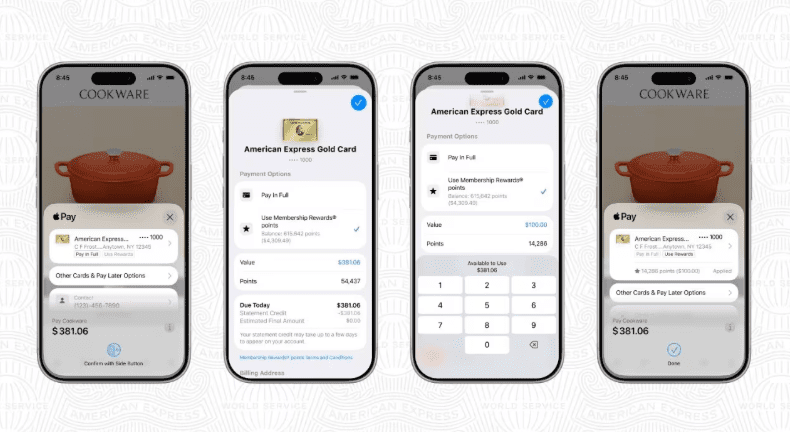
American Express now lets eligible U.S. Card Members redeem Membership Rewards® points directly through Apple Pay when checking out online or in apps. The feature is convenient, but the redemption rate is the part to pay attention to: the Apple Pay option appears to give 0.7 cents per point, or $70 for every 10,000 Membership Rewards points.
For most people who collect Amex points for travel, I’d treat this as a backup option rather than a primary redemption strategy. The checkout flow is easy, but the lower value is hard to ignore compared with flights, some Amex Travel redemptions, and transfer partners.
Terms apply to American Express benefits and offers. Enrollment may be required for select American Express benefits and offers. Visit americanexpress.com to learn more.
Quick Take
Amex’s new Apple Pay redemption option lets eligible Membership Rewards cardholders apply points during Apple Pay checkout without leaving the payment flow.
The good news: the process is simple. You can use points on eligible online and in-app purchases on iPhone or iPad, and you can apply points toward all or part of the purchase.
The tradeoff: the value is low. At 0.7 cents per point, 10,000 Membership Rewards points cover about $70. By comparison, Amex’s own examples show flights through American Express Travel at up to 1 cent per point, Cover Your Charges at 0.6 cents per point, and Pay with Points at checkout generally ranging from 0.7 to 1 cent per point depending on the option. Travel partner transfers can be worth more, but they require more work and award availability.
My take: register it mentally as a convenience feature, not a reason to burn a large Membership Rewards balance.
 American Express® Gold Card
Annual fee: $325
Terms apply | Rates & Fees
Sebby's take: One of the strongest cards that's great for people who spend a lot on dining, U.S. supermarkets, and flights booked directly. The annual fee is offset with a monthly dining credit and monthly Uber Cash.
Sebby's take: One of the strongest cards that's great for people who spend a lot on dining, U.S. supermarkets, and flights booked directly. The annual fee is offset with a monthly dining credit and monthly Uber Cash.
 American Express Platinum Card®
Annual fee: $895
Terms apply | Rates & Fees
Sebby's take: Despite a hefty annual fee, you get up to $3,500 in credits that help offset this. The card is great for people who benefit from lounge access, travel protections, and access to programs like Fine Hotels & Resorts.
Sebby's take: Despite a hefty annual fee, you get up to $3,500 in credits that help offset this. The card is great for people who benefit from lounge access, travel protections, and access to programs like Fine Hotels & Resorts.
What Changed?
On June 30, 2026, American Express announced Use Pay with Points with Apple Pay for eligible U.S. Card Members.
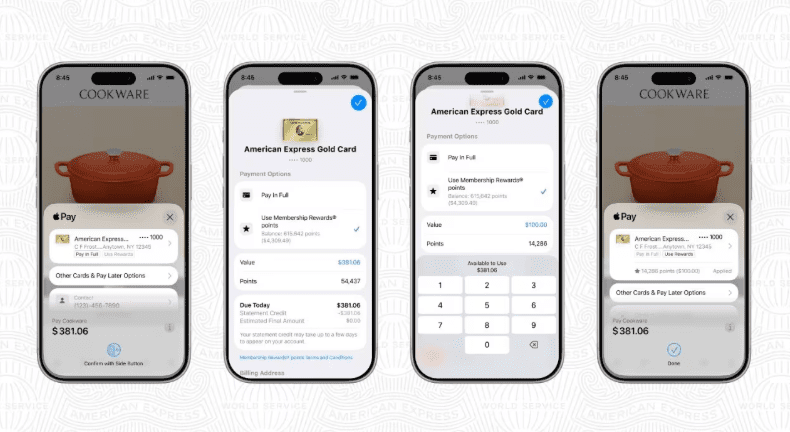
The feature lets eligible cardholders redeem Membership Rewards points inside the Apple Pay checkout experience for eligible purchases. According to American Express, you don’t need to open another app, leave checkout, or complete a separate redemption flow.
The basic process is:
- Shop online or in an app on iPhone or iPad.
- Select Apple Pay at checkout.
- Choose an eligible American Express Membership Rewards Card.
- Tap Use Rewards.
- Enter the amount of points you want to apply.
- Complete the Apple Pay transaction.
You can use it to cover either part of the purchase or the full eligible purchase amount.
The Redemption Rate: 0.7 Cents Per Point
The most important number is the redemption rate.
Membership Rewards points redeemed through Apple Pay are worth 0.7 cents each.
Here’s the math:
| Points Redeemed Through Apple Pay | Approximate Value |
|---|---|
| 1,000 points | $7 |
| 5,000 points | $35 |
| 10,000 points | $70 |
| 25,000 points | $175 |
| 50,000 points | $350 |
| 100,000 points | $700 |
That rate is better than using Membership Rewards points for Cover Your Charges at 0.6 cents per point, but many Amex redemptions can do better.
If you were going to cash out points at a low value anyway, Apple Pay may feel smoother than waiting for a statement credit redemption. If your plan was to use points for travel, this is usually a downgrade.
How Apple Pay Compares to Other Amex Redemption Options
American Express Membership Rewards points don’t have one fixed value. The value changes based on the redemption method.
| Redemption Option | Typical Value | Notes |
|---|---|---|
| Apple Pay Pay with Points | 0.7 cents per point | Convenient checkout option for eligible online and in-app purchases |
| Cover Your Charges | 0.6 cents per point | Flexible, but usually weak value |
| Most prepaid hotels through Amex Travel | 0.7 cents per point | Similar value to Apple Pay for many hotel bookings |
| Flights through Amex Travel | Up to 1 cent per point | Easier travel redemption, but not always best value |
| Select gift cards | Up to 1 cent per point | Value varies by merchant |
| Transfer partners | Varies | Often best upside, but award availability and transfer risk matter |
The key comparison is Apple Pay versus transfers.
If you redeem 50,000 points through Apple Pay, you’re getting about $350 toward eligible purchases. If you transfer those same points to an airline partner and find a strong award, you may get far more than $350 in flight value. There’s no guarantee, though. Transfers are usually final, and the best redemptions often require flexibility, award-search time, and a willingness to learn partner programs.
That’s why I wouldn’t say Apple Pay is useless. It solves a different problem. It gives people a very simple way to use points. Simplicity comes with a lower redemption value.
Who Should Consider Using Points Through Apple Pay?
This option can make sense in a few situations.
You have a small orphaned points balance
If you have a small Membership Rewards balance and you’re not planning to earn more, Apple Pay gives you an easy exit. A few thousand points won’t get you far with airline transfers, but they can offset part of a purchase.
You don’t travel enough to use transfer partners
Transfer partners are usually where Amex points shine, but they’re not helpful if you never redeem for flights or hotels. If you value simplicity over optimization, 0.7 cents per point is a straightforward cash-equivalent redemption.
You need to reduce cash out of pocket
Sometimes the personal finance answer is more important than the points answer. If using points helps you avoid carrying a balance or keeps cash available for something more important, the lower cents-per-point value may be acceptable.
You were going to redeem at 0.6 cents anyway
If the alternative is Cover Your Charges at 0.6 cents per point, Apple Pay at 0.7 cents per point is a slight improvement. I still wouldn’t call it strong, but Amex has worse Membership Rewards redemptions.
Who Should Skip It?
Most points and miles optimizers should skip this for large redemptions.
If you collect Membership Rewards points from cards like the American Express® Gold Card, American Express Platinum Card®, The Business Platinum Card® from American Express, or The Blue Business® Plus Credit Card from American Express, the main reason to earn transferable points is optionality.
Using 100,000 points through Apple Pay would give you about $700 in value. That same 100,000-point balance could potentially cover a premium flight, multiple domestic flights, or a higher-value partner redemption if you find the right award space.
The Apple Pay option is also a poor fit if you’re close to booking a trip and already know how you’ll use your points. Once you spend the points at checkout, they’re gone.
Things To Watch Out For
Eligible purchases and eligible cards matter
American Express describes this as available to eligible U.S. Card Members and eligible purchases. If you don’t see Use Rewards during Apple Pay checkout, your card, merchant, device, purchase, or account may not qualify.
The rate can change
American Express states that redemption values and available redemption options can change. Before using a large number of points, check the value shown at checkout and do the math.
Convenience can make weak redemptions too easy
The friction used to be part of the protection. If you had to log in, search for redemptions, or manually request a statement credit, you had time to think about whether the redemption was worth it.
Apple Pay removes that friction. That’s great for ease of use, but it can also make it easier to spend valuable points on routine purchases.
You may be using points on purchases that would earn rewards
Amex says you can earn rewards when using your Card through Apple Pay in the same way as using the physical Card, assuming the transaction is eligible. The redemption side is separate: you’re choosing to apply existing points toward the purchase. Check the final checkout details so you understand how many points you’re redeeming and what cash amount remains.
Sebby’s Take
I like the convenience, but I don’t like the redemption rate for most people.
At 0.7 cents per point, this is a reasonable emergency valve or small-balance exit. I wouldn’t point active Membership Rewards collectors there for routine redemptions.
The better strategy is still to earn Membership Rewards points with a plan: flights through Amex Travel when you want simplicity at up to 1 cent per point, transfer partners when you want upside, and Apple Pay only when convenience matters more than maximizing value.
If Amex eventually runs targeted promos or limited-time boosts through Apple Pay, the math could change. Without a bonus, I’d keep most of my Membership Rewards points away from Apple Pay checkout.
Frequently Asked Questions
Can you redeem Amex Membership Rewards points through Apple Pay?
Yes. American Express now lets eligible U.S. Card Members redeem Membership Rewards points through Apple Pay for eligible online and in-app purchases.
What is the Amex Apple Pay redemption rate?
The reported rate is 0.7 cents per point. At that rate, 10,000 Membership Rewards points are worth about $70 through Apple Pay.
Is using Amex points through Apple Pay a good deal?
Usually not if your goal is maximum value. It can be useful for convenience, small balances, or people who don’t plan to use transfer partners. For larger balances, travel redemptions and transfer partners usually deserve a look first.
Can you cover part of a purchase with Amex points through Apple Pay?
Yes. American Express says eligible Card Members can use points to cover all or part of an eligible purchase during Apple Pay checkout.
Do you need to leave Apple Pay to redeem points?
No. The feature is built into the Apple Pay checkout flow. Select an eligible Amex Membership Rewards Card, choose Use Rewards, enter the amount, and finish checkout.
Which Amex cards work with Apple Pay redemptions?
American Express says the feature is for eligible U.S. Card Members with eligible Membership Rewards Cards. If your card earns Membership Rewards points and is eligible, the Use Rewards option should appear during Apple Pay checkout for qualifying purchases.
Final Thoughts
Amex adding Membership Rewards redemptions to Apple Pay is useful, but mostly because it makes points easier to spend.
The rate is the problem. At 0.7 cents per point, you’re getting $70 for every 10,000 points. The math is simple and predictable, but far below what many people are trying to get from transferable points.
I’d use Apple Pay redemptions only for small balances, convenience, or situations where cash flow matters more than cents per point. For most people, Membership Rewards points are still better saved for travel redemptions or transfer partners.
💳 Featured Card Offers
As High As 100,000 points. Find Out Your Offer.
Terms apply | Rates & Fees
You may be eligible for as high as 175,000 Membership Rewards® Points
Terms apply | Rates & Fees
In this article
- Quick Take
- What Changed?
- The Redemption Rate: 0.7 Cents Per Point
- How Apple Pay Compares to Other Amex Redemption Options
- Who Should Consider Using Points Through Apple Pay?
- Who Should Skip It?
- Things To Watch Out For
- Sebby’s Take
- Frequently Asked Questions
- Final Thoughts
💳 Featured Card Offers
As High As 100,000 points. Find Out Your Offer.
Terms apply | Rates & Fees
You may be eligible for as high as 175,000 Membership Rewards® Points
Terms apply | Rates & Fees